The first three demos use the same generated machine, "Demo gantry 600x600x300 + A": a fixed base with a table and two rails, a gantry moving in Y, an X carriage on it, a Z head, a rotary chuck (A) on the base near the back-left with its axis along X, and a tailstock. Tool-side links carry collision boxes and cylinders. The demo controller ignores programmed F and uses defaultFeed 1000 mm/min, so almost every program has the yellow warning the controller ignores programmed F (#101 = default speed); feeds use defaultFeed 1000 mm/min. The results in the tables were obtained by running each program.
/app?demo=demo (default, public/demo/; also the Projects window's Try the demo): a vise on the table with a 100×60×40 stock block (default resolution 0.15 mm, 240 cm³).
| Program | What it shows | Result |
|---|---|---|
part.nc |
Contour, circle and drilling with two tools. | Clean; "not confirmed" warnings for the canned cycle (line 30) and G28 (line 37); removes ≈ 1.69 cm³. |
overtravel.nc |
Deliberate over-travel on X and Z, and the resulting crash into stock, vise and table. | 2 axis-limit warnings, 16 collisions. The G1 at Z-5 through the whole block is cutting and is not reported. |
plunge.nc |
A rapid plunge into the stock. | Line 8: cutter T1 hits stock on a rapid move at X 270.000 Y 300.000 Z -150.500 A 0.000. |
vise.nc |
The holder of a short tool hits the fixed vise jaw on a feed move. | Line 9: holder T4 hits fixture at X 346.000 Y 289.000 Z -190.000 A 0.000. |
dogleg.nc |
A rapid that is safe as a straight line. | Clean with rapidMode: "interpolated" (the demo setting); with "independent" the dog-leg's first leg runs into the stock on line 8. |
rotary.nc |
4-axis moves in air above the rotary axis. | Clean. |
dialect.nc |
Codes the simulator flags: N numbers, G41, G93, R < 0, macros, G10, M7, subprograms. | Banner 3 lines were not executed; no collisions. |
pocket.nc |
A 40×20×5 pocket with corner radius 3, cut with a Ø6 flat end mill. | Clean; removes ≈ 3.98 cm³. |
slot.nc |
A ball slot 1.5 deep along X with a Ø4 ball mill. | Clean; removes ≈ 0.355 cm³. |
/app?demo=demo-rotary (public/demo-rotary/): a plate and a 400×50×40 stock on the rotary chuck (default resolution 0.20 mm).
| Program | What it shows | Result |
|---|---|---|
wrap.nc |
Continuous X+A wrap, then an indexed pass at A90. | Clean; removes ≈ 2.75 cm³. |
jaw.nc |
A chuck jaw turns into the tool during an A move. | Line 9: cutter T1 hits a_chuck at X 88.000 Y 520.000 Z -135.000 A 101.038. |
tailstock.nc |
The spindle body runs into the tailstock. | Line 9: z_head hits tailstock at X 580.000 Y 460.000 Z -200.000 A 0.000. |
/app?demo=demo-wrap (public/demo-wrap/): a Ø60×200 cylinder in the rotary chuck, no fixture (default resolution 0.20 mm, 566 cm³ on the grid). Work X0 is the cylinder's left face, work Z0 is on the A axis. All three programs are clean.
| Program | What it shows | Removed |
|---|---|---|
ring.nc |
A groove 6 wide and 2 deep around the cylinder in one full turn of A (Ø6 flat end mill). | ≈ 2.19 cm³ |
index.nc |
3+1 indexed flats 5 deep at A0 and A90 (Ø6 flat end mill). | ≈ 10.4 cm³ |
helix.nc |
A helical ball groove 1.5 deep over three turns of A while X moves 60 mm (Ø4 ball mill). | ≈ 2.41 cm³ |
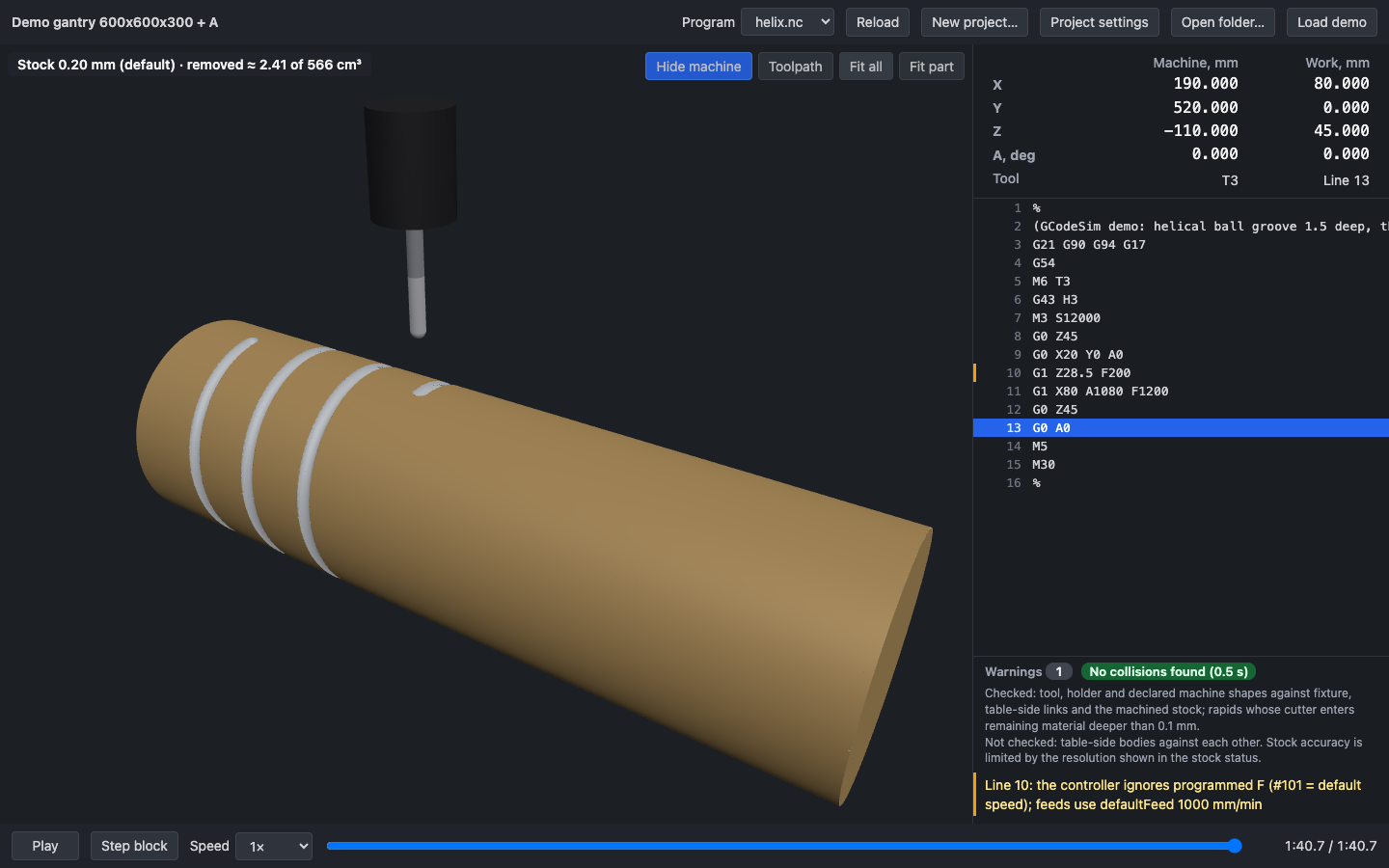
Figure 3. /app?demo=demo-wrap, helix.nc at the end, with Machine and Toolpaths unchecked under Show ▾ and "Fit all": the three turns of the helical groove on the cylinder.
/app?demo=demo-grbl (public/demo-grbl/): a GRBL router job on the catalogue's Shapeoko 4 XXL (GRBL 1.1, soft limits on, homed back-right: every program starts at machine (−5, −5, −5); toolChange: "touch-off"). A 300 × 200 × 18 sheet lies on the spoilboard at (100, 100) with no fixture; T1 is a Ø6.35 flat end mill (40 mm from the gauge line), T2 a Ø3.175 ball mill (35 mm). G54 is the sheet's top-front-left corner, set by stock point with T1 touched off there: X −738 Y −738 Z −104 (Z is the gauge line: the touch-off model, toolChange in section 4.2). The programs show the three typical GRBL cases (figure 3a):
| Program | What it shows | Result |
|---|---|---|
sign.nc |
A Fusion 360 grbl-post job with M6 on: G28 G91 Z0 retracts, T1 / M6, a pocket entered by G17 helical ramps and left by a G18 arc, G4 P0.5, a through profile with two tabs that goes 0.3 mm into the spoilboard, then T2 M6 engraves a slot; ends with G28 G91 X0 Y0 at the back-right corner and M30. |
Clean. The only entry is the note on line 11, M6: simulated as a manual change with Z touched off again, …. The 0.3 mm into the spoilboard is within its 1.5 mm cut allowance; 2 mm deep would be cutter T1 cuts 2 mm into spoilboard (allowance 1.25 mm). |
vcarve.nc |
A one-tool Carbide Create / VCarve file: %, an empty () comment, a bare T1, packed words (G1X260.00Y40.00F1500.0), no M6, M2. |
Clean (no banner): the % note (line 1) and the note no tool change in program — GRBL ignores T; T1 from the setup is in the spindle (line 9), tagged Note. |
wrongpost.nc |
A generic Fanuc post streamed to GRBL: O1001, N numbers, G64, T1 M6, G43 H1, a G81 drilling cycle. |
DO NOT RUN (task055), Check tag Problems, no collision: 4 rejected lines — GRBL rejects line 2 (error:20); the sender stops the job there. GRBL rejects O1001 (line 2), G64 (6), G43 (10) and G81 (11) with error:20, each a Not executed entry with the post hint; the first adds — the sender stops the job here; the simulation goes on as if you continued. The N numbers are accepted; line 1 has the % note and line 7 the M6 note. On the machine the job would stop at line 2, so a program from the wrong post is a DO NOT RUN even when nothing collides (section 6.3). |
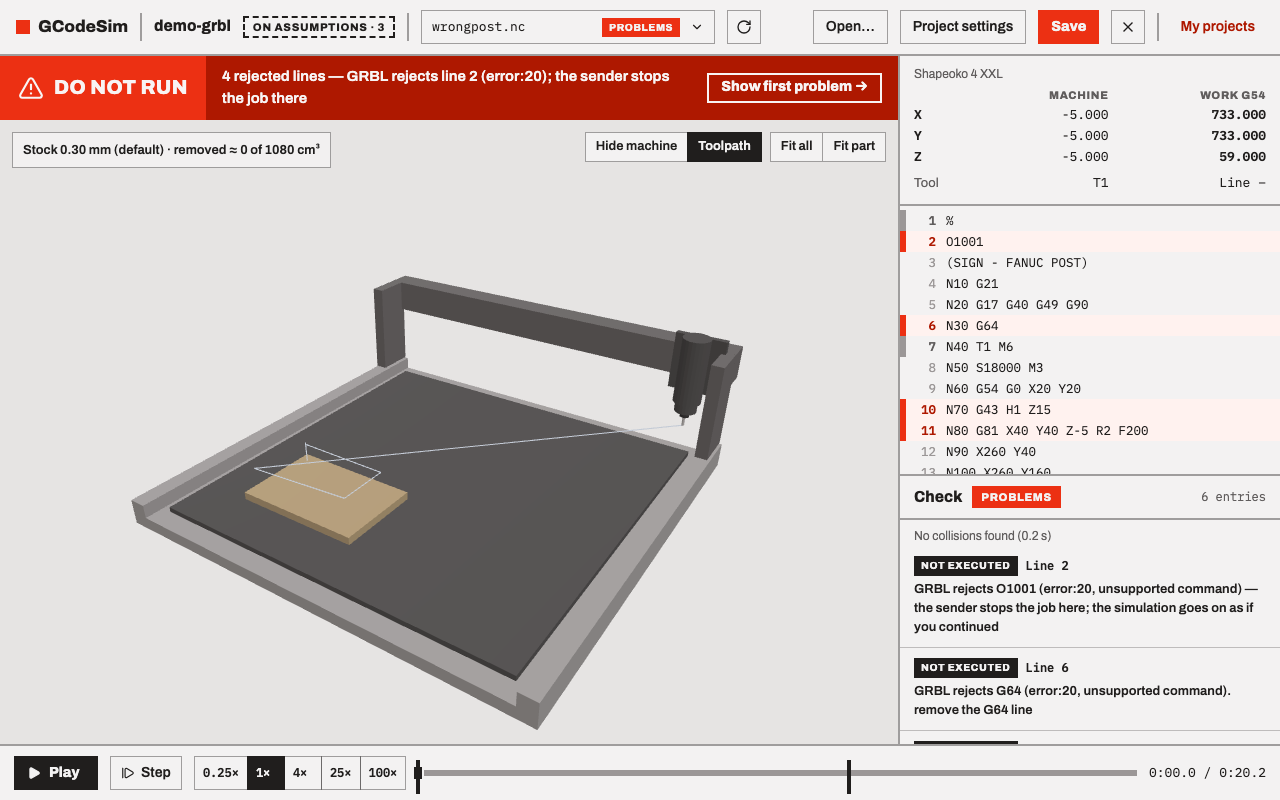
Figure 3a. /app?demo=demo-grbl, wrongpost.nc: the Do not run verdict counts the four lines GRBL rejects; the listing marks lines 2, 6, 10 and 11; the Check list starts with GRBL rejects O1001 (error:20, unsupported command) — the sender stops the job here; …. The machine stands at its start pose, the homed back-right corner (machine X −5 Y −5 Z −5).
Choosing another GRBL machine in the Project tab → Machine runs the same job on it; the G54 set by stock point follows the sheet. On the OpenBuilds LEAD 1010 (homed front-left) the first rapid starts at (−725, −805, −5) and the readout shows negative machine coordinates throughout.
npm run demo regenerates the four demo folders and the catalogue machines (machines/) from tools/gen-demo.ts.